


Vagaro
4.22.61K Reviews
App Specs
- Version
- 5.4.8
- Updated On
- License
- Free
- Downloads
- 1,000,000+
- Developer
- Vagaro Inc
- Categories
- Lifestyle
- Platform
- Android, iOS
Screenshots

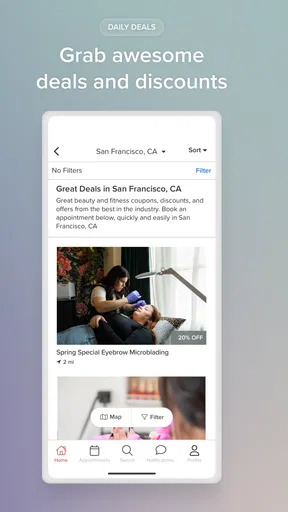
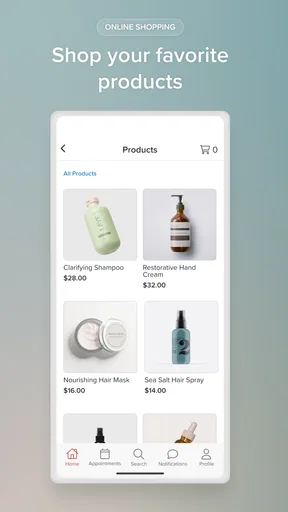
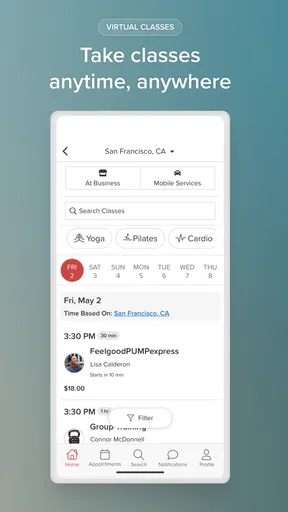
 Analysis by AppCompare
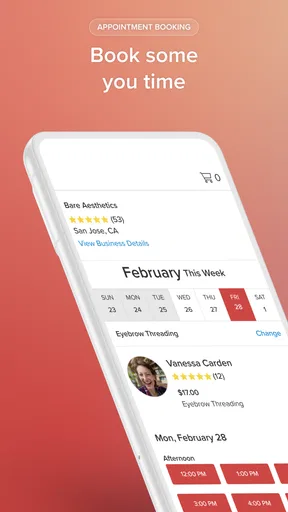
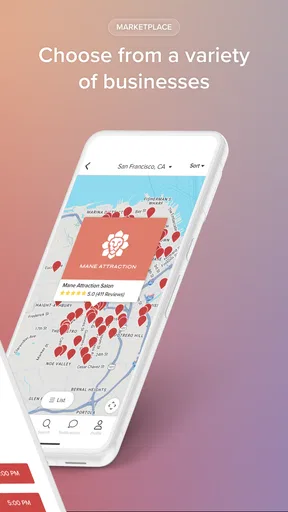
I started using Vagaro because booking a haircut, massage, class, or gym session was becoming one of those small household tasks that somehow required too many messages. One person would find a salon, another would check the time, and someone else would remember that the appointment had never actually been booked. This lifestyle app brings those searches into one place, covering beauty and fitness appointments from salons, spas, gyms, and fitness studios.
My first impression was practical rather than flashy. Vagaro is not trying to replace every calendar or become a social network for wellness. Its useful role is narrower: help me find a suitable local service and arrange a booking without switching between several business websites. That focus makes it particularly handy in a shared household, although it also means the experience depends heavily on which businesses in my area use the platform and how well those businesses keep their availability updated.
It is free to install, aimed at Everyone, and developed by Vagaro Inc. The app has been available since June 16, 2012, and its current version is 5.4.8, with Android support from version 8.1 onward. Those details matter if I am installing it on an older family phone or a shared tablet: it is not limited to recent hardware, but I would still check that the device meets the minimum system requirement before planning around it.
How Vagaro works in a shared household
A realistic example is a busy Saturday morning. I may need a haircut, my partner may want to book a massage, and a teenager in the household may need a fitness class or another appointment arranged with an adult. Instead of opening several separate business sites, I can use Vagaro to look through available local options and compare the practical details that affect the choice, such as location, service type, and appointment time.
The biggest benefit here is not simply finding a business. It is reducing the back-and-forth required to coordinate several people. I can first search for the service, then discuss the shortlist with the household before committing. That is a better workflow than booking the first acceptable slot and discovering later that it clashes with school, work, transport, or another appointment.
I would not treat the app as a complete family organizer, though. It is a booking tool, not a shared household calendar. I still need to record the final appointment somewhere everyone can see, especially when the booking concerns another person. A useful habit is to confirm the service, date, time, and business immediately after booking, then add those details to the household calendar manually. That small extra step prevents Vagaro from becoming the only place where an important appointment exists.
Another helpful approach is to search by the person’s actual need rather than by a vague goal. “I need to feel better” is not a useful search strategy, while a specific service or class type gives me a clearer starting point. Once I find a suitable business, I can compare times before discussing the option with someone else. This makes the app more useful for coordination than simply handing a phone around and asking each person to browse without a plan.
Worth Reading Before You Choose

EA SPORTS FC Mobile 26 Is a Bigger Football Game, but It Takes Time

Flipboard Shows What News Apps Must Do Beyond the Feed

Switching to Android Auto Means Rethinking Your Driving Routine

Google Calendar Makes a Crowded Week Easier to Manage

Ludo King Makes the Most of the Minutes Between Plans

Baby Panda World Brings Quick Play to Modern Phones, but Its Game Library Feels Busy
Keeping personal choices separate
Shared-device use needs a little care. If several people use the same phone or tablet, I would avoid assuming that one person’s account should represent everyone. The person making the booking should review the account details and booking information before confirming anything. That boundary matters because an appointment can involve personal preferences, contact details, or a service that another household member should not accidentally alter.
In my view, the cleanest arrangement is one main user handling bookings for the household while each appointment is clearly identified in the shared calendar. If two adults regularly book their own services, separate account use is more sensible than passing one login around. It keeps responsibility clearer and reduces the chance that one person will mistake another person’s appointment for their own.
I also recommend checking the final booking screen carefully instead of relying on the search result alone. Search results help me discover options, but the actual appointment is the part that matters. Before confirming, I would verify the selected service and time, especially when a business offers several versions of what sounds like the same treatment or class. This is a simple but important distinction between browsing and making a commitment.
For a shared tablet in a living room, I would be especially mindful of leaving the app open. Even when the device is used by trusted people, account boundaries become less clear when the next person can immediately continue from the previous screen. Closing the session or returning to a neutral screen is a sensible household habit. I am not describing a special family mode; I am describing the basic discipline needed whenever one device serves several users.
Coordinating appointments without creating confusion
Vagaro is strongest when one person takes ownership of the booking process and the rest of the household contributes preferences before confirmation. For example, I might ask whether a morning or evening slot works, search the available appointments, and then book only after receiving a clear answer. That is faster than sending multiple screenshots of different businesses and asking everyone to decide after the availability has changed.
For recurring needs, I would not assume that one successful booking automatically solves future scheduling. A gym class, salon visit, or spa appointment may need to be arranged again, so I would keep a simple record of the preferred business and service outside the app. This creates a useful personal reference without pretending that Vagaro is a full routine-management system.
There is also a trade-off between convenience and flexibility. Searching through one service can expose me to businesses I would not have found through a normal web search, but I may still prefer contacting a business directly when the appointment is unusual. A complicated request, a group booking, or a question about suitability may be better handled by speaking with the provider. Vagaro helps me discover and arrange ordinary appointments; it does not remove the value of asking a professional a direct question.
When coordinating for someone else, I would also repeat the essential details in the message or calendar entry: the business name, service, date, time, and address if needed. This is one of the most practical habits I found. A booking confirmation inside an app is convenient for the person who made it, but another household member may need a plain reminder they can understand without opening the same account.
Another non-obvious advantage is that the app can make comparison more deliberate. Instead of choosing a familiar business automatically, I can look at nearby alternatives and consider whether a different time or location fits the household better. That is useful when transport, childcare, or work schedules matter more than brand loyalty. The limitation is that the best option may still be outside the platform, so I would use Vagaro as a strong starting point rather than an absolute directory of every local provider.
Age, trust, and who should handle the booking
The Everyone rating makes the app broadly suitable for general household use, but that does not mean every appointment is equally appropriate for every person. The service being booked is the important context. An adult should guide a younger household member when the appointment involves personal care, payment decisions, travel, or sharing contact information with a business.
I would be comfortable letting an older child browse options with me, compare times, and explain which class or service sounds appealing. I would be less comfortable letting a child independently confirm an appointment without an adult checking the details. The app can help with discovery, but trust still comes from the household’s own rules and the relationship with the provider.
This distinction is especially important on a shared device. A child might open the app to look at fitness options while an adult’s account remains active. I would not rely on the app alone to separate those situations. Instead, I would supervise the booking process, make sure the correct person is represented, and avoid leaving personal appointment information visible when the device returns to general household use.
Adults should also remember that a convenient booking is still a commitment. If someone is booking for a partner or relative, they should confirm that the person actually wants the service and can attend at that time. The app helps coordinate the transaction, but it cannot resolve disagreements about schedules or preferences. In that sense, its success depends on good household communication before the final tap.
What feels better than the usual alternatives
Compared with searching the web one business at a time, Vagaro feels more focused for people who already know they want a beauty or fitness appointment. I can begin with the type of service instead of guessing which local businesses might offer it. That reduces the number of tabs and makes the first stage of planning less scattered.
Compared with calling every business, the app is more convenient when my schedule is irregular or I am booking outside normal conversation hours. I can browse available possibilities when it suits me rather than waiting to speak with someone. That is particularly useful for a quick appointment during a lunch break or while organizing several household errands.
Compared with a general calendar app, Vagaro is better at discovery and booking but worse as a shared record of family plans. A calendar tells everyone what has been scheduled; Vagaro helps me find and arrange the service in the first place. I would use both rather than expecting either one to do the other’s job.
Compared with booking directly through a favorite salon or gym, Vagaro may be more efficient when I am open to alternatives. Direct booking can still be preferable when I already have a trusted provider, need to discuss a special request, or want a relationship that does not depend on browsing a marketplace-style app. The right choice depends on whether discovery or familiarity is more important for that appointment.
Its rating of 4.2 from around 7,600 ratings, along with more than a million installs, suggests that the app has found a substantial audience, but I would not interpret that as a guarantee that every local search will be equally useful. Local coverage and provider participation shape the experience. A person in an area with many participating businesses may find it very convenient, while someone with limited nearby options may get more value from direct searches and phone calls.
Small frictions I noticed in real use
The first friction is that convenience can encourage rushed decisions. A time that looks perfect may not be practical once travel and household responsibilities are considered. I learned to compare the appointment with the rest of the day before confirming, rather than treating an available slot as automatically suitable.
The second is responsibility for communication. If I book for another person, I need to pass the information on clearly. The app does not replace a conversation about who is attending, how they will get there, or what they should expect. This is easy to overlook when the booking itself takes only a short time.
The third is that a centralized search can make me forget to check the provider’s own expectations. For a straightforward haircut or class, the app may be enough to get started. For anything more personal or specialized, I would still contact the business if I have questions about preparation, suitability, accessibility, or changes to the reservation.
I also would not recommend it as the only tool for someone who wants deep household scheduling features. If the main problem is coordinating school events, medical appointments, chores, and shared reminders, a family calendar is a better foundation. Vagaro earns its place alongside that tool when the specific task is finding and booking beauty or fitness services.
Who will get the most from Vagaro
I think the app is a good fit for adults who regularly book salon, spa, gym, or fitness-studio services and want one starting point for those searches. It is also useful for a household member who manages appointments for others, provided they keep the final details visible in a shared calendar or another agreed place.
It suits people who value browsing several options before choosing, especially when location and time are more important than using one familiar provider. It can also save effort for someone who dislikes phone calls or needs to arrange an appointment while working around an unpredictable day.
I would be more cautious about recommending it to someone who already has a trusted provider and prefers direct communication. That person may gain little from another booking layer. I would also suggest a different primary tool for a family seeking parental controls, detailed shared calendars, or comprehensive care coordination. Vagaro can support those routines, but it should not be mistaken for a dedicated household-management system.
For older phones, the minimum Android requirement of 8.1 is worth checking before installation. The app itself is free, which makes trying it low-risk from an app-cost perspective, but the appointments and services arranged through it are separate real-world commitments. I would still review every booking carefully and make sure the person attending agrees with the choice.
My household verdict
After using Vagaro as a practical booking assistant, I see its value most clearly in the gap between discovery and coordination. It gives me a more organized way to look for beauty and fitness appointments, while leaving the household responsible for deciding who attends, whether the time works, and where the final appointment should be recorded.
The best way to use Vagaro in a shared home is to treat it as the booking desk, not the family memory. Let one person manage the transaction, keep account boundaries clear, confirm the service with the person attending, and copy the result into the household calendar. That workflow avoids most of the confusion that can arise when several people share one phone or one account.
I recommend it to anyone who wants a free, focused way to arrange local salon, spa, gym, or fitness-studio appointments and who is comfortable doing a little coordination outside the app. I would skip it as a primary household organizer, and I would choose direct contact when an appointment needs detailed discussion. Used for what it does best, Vagaro is a useful bridge between finding a service and getting it onto a real person’s schedule.
Pros
- Online booking and payments make appointment management convenient.
- Supports memberships
- packages
- gift certificates
- and recurring services.
- Built-in marketing tools help businesses promote offers and retain clients.
- Client profiles can store notes
- preferences
- and appointment history.
- Available on mobile and web
- making access flexible for staff and clients.
Cons
- Many useful features require higher-priced subscription plans.
- The interface may feel overwhelming for first-time users.
- Payment processing fees can increase overall operating costs.
- Some customization options are limited without technical workarounds.
- Performance may vary when managing large client or service databases.
FAQs for Vagaro
What is Vagaro used for?
Vagaro is a business management and booking platform designed mainly for salons, spas, barbershops, fitness studios, beauty professionals, and other appointment-based businesses. Customers can use the app to discover nearby providers, view services, check prices, read available information, book appointments, and sometimes purchase products or memberships. The exact features you see may depend on the business using Vagaro and your location.
Can I book, cancel, or reschedule appointments through Vagaro?
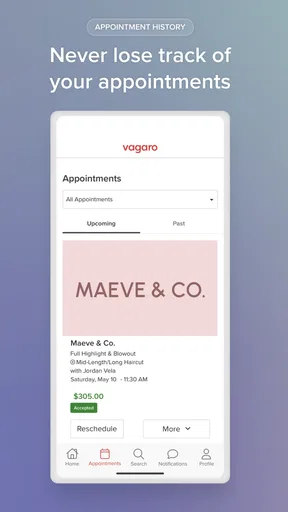
Yes, Vagaro generally allows customers to search for participating businesses and manage appointments directly from the app. You can usually select a service, staff member, date, and time before confirming the booking. Cancellation and rescheduling options depend on the provider’s individual policy, including notice periods and possible fees. Always review the business rules shown during booking so you understand the consequences before confirming.
Is Vagaro free for customers to download and use?
The Vagaro app is typically free for customers to download, although the services you book through it are not free. Prices are set by each salon, spa, trainer, or other provider, and additional charges may apply for deposits, cancellation fees, memberships, products, or taxes. Businesses may also require a card on file or advance payment, so check the final booking summary carefully.
Does Vagaro require an account or personal information?
Some browsing may be possible without completing a full registration, but an account is generally useful or required for booking and managing appointments. Vagaro may request information such as your name, email address, phone number, and payment details, depending on the business and transaction. Before signing up, review the app’s privacy policy and only provide the information necessary for the services you intend to use.
Is Vagaro available on both Android and iPhone?
Vagaro is designed for mobile users and is generally available through the official app stores for Android and iOS, although availability can vary by country, device compatibility, and regional support. For safety, download it only from Google Play or Apple’s App Store rather than unofficial websites. After installation, make sure the app version and your device’s operating system are supported for the best experience.


